


In our August 27th Frogtummy Working Group Training, we took a deeper dive into website editing and content management, exploring tools and techniques to help schools get the most out of their Frogtummy websites. Led by Janice Weirich and Halley Miranda, the session highlighted a mix of powerful features and time-saving tips, many of which are useful whether you’re a daily editor or just keeping things updated throughout the year.
Each topic is broken down into short how-to training videos so you can revisit (or catch up on) the tools at your own pace.
Restoring Previous Website Versions
Did something break or disappear after an edit? No worries, Frogtummy’s CMS allows you to view the log and restore earlier versions of your pages with just a few clicks. This feature gives your team the freedom to experiment and update without the fear of losing valuable content.
Copying & Linking Widgets
Want to reuse a layout or block without rebuilding it? You can copy and paste widgets between pages to save time and keep your branding consistent. This is especially helpful for headers, footers, or sections you want to duplicate.
Archiving Board Meetings & Newsletters
We often get questions about how to organize past content. In this session, we walked through how to archive board meeting minutes and newsletters by creating new pages and linking them directly to menus. This method keeps your site clean, compliant, and easy to navigate for families and board members alike.
Customizing with Font Awesome Icons
Need a little more visual flair? Frogtummy has a Font Awesome subscription, giving you an easy way to add visual cues and polish to menus, buttons, and callout sections—without needing custom graphics.
Setting Up Site Notices
Make sure families don’t miss important announcements! Site notices are eye-catching pop-ups that disply on your site when a new visitor arrives. These can easily be used to highlight closures, emergencies, or time-sensitive info you want all visitors to your site to see.
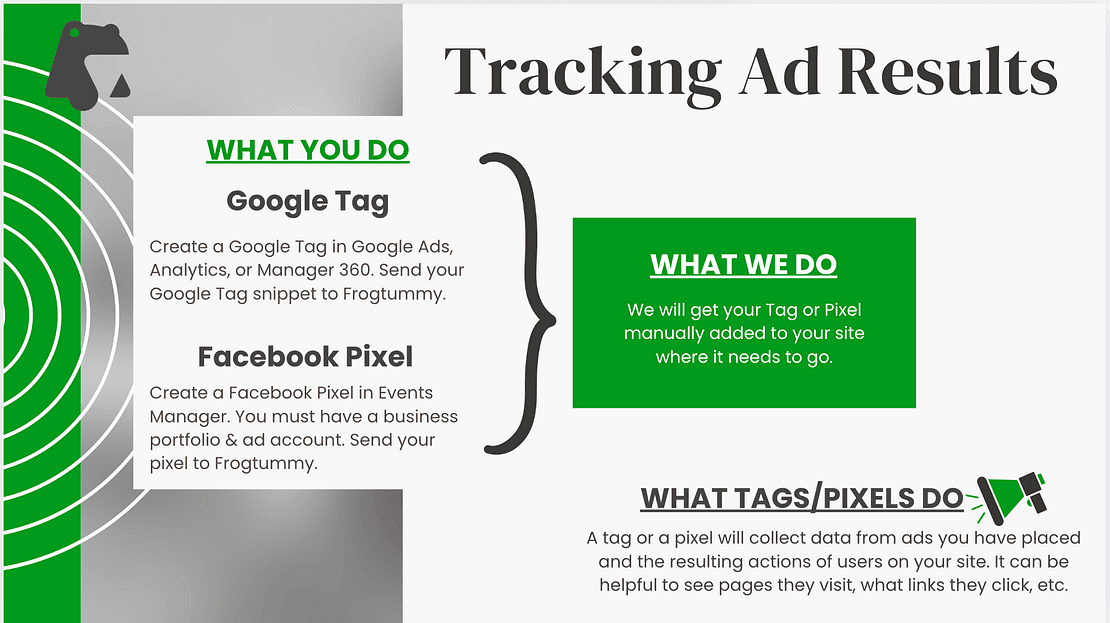
Tracking Social Media Ads
While Frogtummy doesn’t manage social media campaigns, we briefly touched on how schools can track the effectiveness of their ads by using pixels or tags. These tools can help your marketing team see which efforts are driving enrollment interest or engagement on your website.
Live Working Group Discussion 🗣️
Questions from attendees.
Questions from attendees for this working group were focused on the topics laid out above, and attendees were given in-depth instruction on how to complete the tasks and when you would need to use each function.
Restoring Previous Website Versions
Using the log or page history is extremely helpful if you accidentally delete something or need information from a widget you used but are no longer using. If you want to get the page back to where it was before, you can use the history to restore the page. However, if you'd just like some of the information from a previous view, you can use the history to see that information without restoring the whole page.
Copying and Linking Widgets (or blocks)
It can be a huge time saver to copy a widget and then edit it as needed. This is helpful when building out a page so you avoid repeating your work unnecessarily. You can also copy widgets to other pages. When copying complex widgets, you have the option to copy it, creating a standalone version. Or, you can link it, creating a connected widget so updates apply everywhere it is used. This is helpful if you want a form or other complex widget in multiple places on your site and don't want to have to remember to edit each one.
Archiving Board Meetings and Newsletters
Board meeting minutes and newsletter pages can get bogged down with too many entries on the page. Archiving older items can preserve the information you need while keeping a clean, easy-to-read page. Some schools are linking their board meetings directly to the state page, eliminating the need to archive those meetings.
Font Awesome Icons
When using any widget with an icon, you can customize those icons to be exactly what you need. Because Frogtummy has a Font Awesome subscription, you can use those icons anywhere on your site. If you are using them on a widget that has icons, you don't need to know any coding. These icons help your information stand out. You can use them in any place you would have a bulleted list, and you can customize their style and color.
Site Notices
Site notices are a great way to quickly grab the attention of everyone who visits your site, no matter what page they visit. These handy notices pop up when a visitor navigates to your site. They can be scheduled in advance and given a timeframe for how long each one is up on your site. Good uses for notices include school closings, open enrollment, website/building maintenance notices, and any other information you want all website visitors to see. They can be customized to send visitors to another site, a page on your site, an email address, or can even include a file to view.
Tracking Social Media Ads
Many schools use social media for marketing, and a pixel or tag can be added to your site to help you track the results of your ads. This can be used to adjust your marketing strategy, assess campaign effectiveness, and track progress. While Frogtummy does not manage social media marketing for schools, we support schools' efforts by adding pixels or tags to their website.
Watch Recording
24:58 length